Table of Contents
Choosing the right hosting can directly affect how fast your WordPress website loads, how well it handles traffic, and how much technical work you must manage yourself.
Many beginners assume that a VPS will always outperform managed WordPress hosting because it offers dedicated resources and deeper server control. That is not always true.
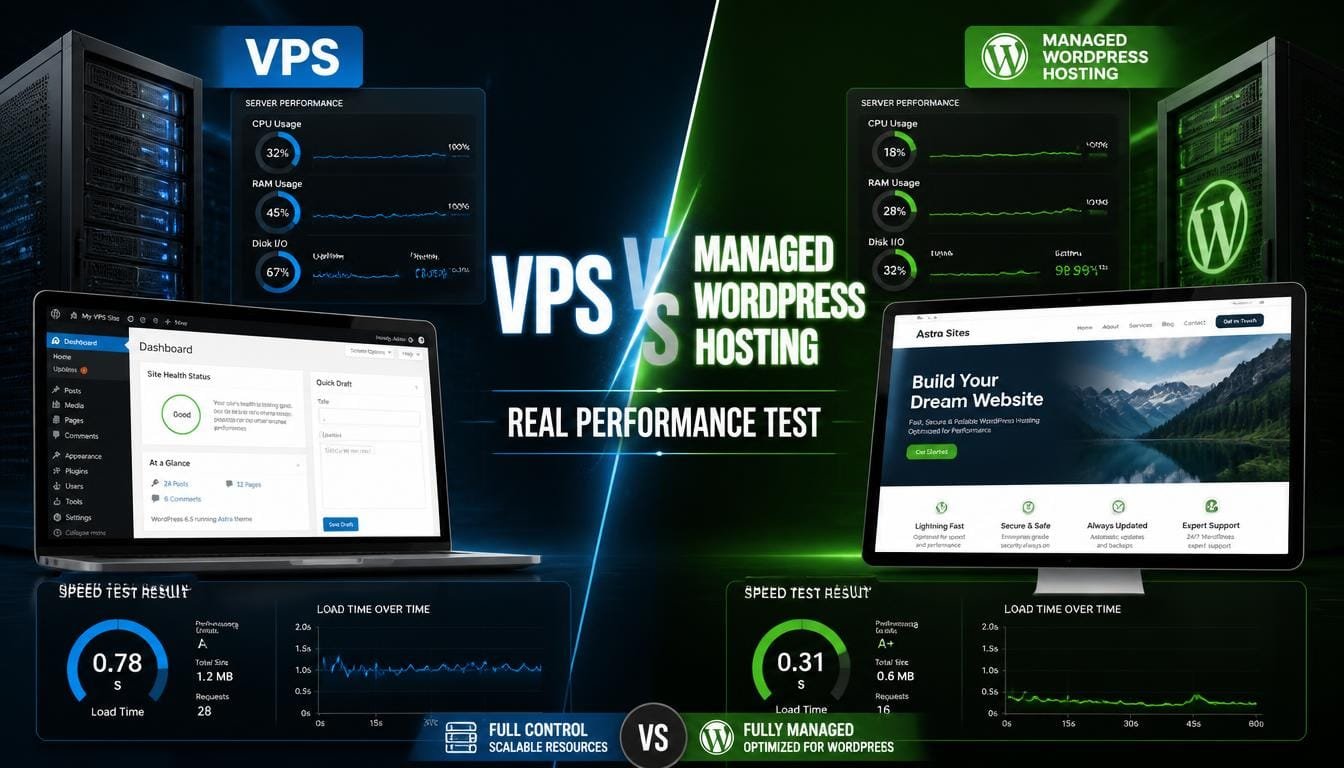
Managed WordPress hosting can deliver faster real-world performance because the server environment is already optimized for WordPress. A VPS can outperform managed environment, but only when you configure and maintain it properly.
This comparison looks beyond marketing claims. It examines the areas that matter most when testing environment performance, including speed, caching, server response time, traffic handling, security, maintenance, and overall value.
If you are building a WordPress blog, business website, affiliate site, or growing content platform, this guide will help you understand which hosting option fits your needs.
You can also explore affordable WordPress and VPS solutions through Hostinger.
What Is VPS Hosting?
Virtual Private Server hosting, gives your website a dedicated virtual portion of a physical server.
Unlike basic shared hosting, your website receives allocated resources such as CPU, RAM, and storage.
You usually get greater control over:
- Operating system
- Web server software
- PHP versions
- Database configuration
- Caching systems
- Security rules
- Server applications
A VPS can be extremely powerful for WordPress. However, performance depends heavily on how you configure the server.
For example, a poorly configured VPS with no page caching can perform worse than optimized managed WordPress environment.
This is the main reason raw server resources do not always equal better website speed.
VPS Hosting Affiliate Opportunity
You can recommend VPS environment to:
- Developers
- Agencies
- Growing businesses
- High traffic websites
- Users running custom applications
- Website owners who need server control
A beginner can consider Hostinger VPS hosting when they need more control and scalable resources.
Pros of Virtual Private Server
- Dedicated virtual resources
- Greater server control
- Flexible software configuration
- Easier resource scaling
- Suitable for custom applications
- Can achieve excellent performance
- Useful for advanced WordPress optimization
Cons of Virtual Private Server
- Requires technical knowledge
- You manage server optimization
- Security configuration becomes your responsibility
- Updates require more attention
- Misconfiguration can reduce performance
- Troubleshooting takes more time
What Is Managed WordPress Hosting?
Managed WordPress hosting is an environment designed specifically for WordPress.
The provider handles many technical tasks for you.
Depending on the provider, managed hosting may include:
- WordPress-specific caching
- Automatic backups
- Security monitoring
- Malware protection
- Managed updates
- Server optimization
- Staging environments
- CDN integration
- Expert WordPress support
The main advantage is simplicity.
You do not need to spend hours configuring Nginx, Apache, PHP-FPM, Redis, MySQL, or server-level caching.
The provider handles much of that work.
For beginners, this can create better real-world performance because the website starts with an optimized foundation.
Managed WordPress plans are also useful for bloggers who want to focus on content rather than server administration.
Managed WordPress Hosting Affiliate Opportunity
Managed WordPress Plan is easier to recommend to:
- New bloggers
- Small businesses
- Affiliate marketers
- Content creators
- Portfolio websites
- Local businesses
- Non-technical users
You can promote a suitable WordPress hosting plan through Hostinger.
Pros of Managed WordPress Plan
- Beginner-friendly
- WordPress-specific optimization
- Less technical work
- Automatic maintenance
- Built-in caching
- Better WordPress support
- Faster setup
- Improved security management
Cons of Managed WordPress Plan
- Less server control
- Custom configurations may be limited
- Some providers restrict certain plugins
- Advanced users may need more flexibility
- Higher tiers can cost more than basic shared hosting
The Real Environment Performance Test Methodology
A meaningful environment comparison should not rely on a single speed test.
Website performance changes based on traffic, caching, server location, page size, plugins, and database activity.
For this hosting comparison, the most important performance indicators are:
- Server response time
- Time to First Byte
- Full page loading speed
- Caching efficiency
- Traffic handling
- Database performance
- Maintenance requirements
A fair test should use the same:
- WordPress version
- Theme
- Plugins
- Images
- Page content
- PHP version
- CDN settings
- Testing location
Tools such as Google PageSpeed Insights, WebPageTest, and GTmetrix can help you measure these performance indicators.
These tools provide DoFollow external resources for readers who want to test their own hosting performance.
1. Speed Test Results: Managed WordPress Wins for Beginners
The first hosting test focuses on speed.
A managed WordPress environment often performs well immediately after setup.
Why?
Because the provider may already configure:
- Server-level caching
- PHP workers
- Database optimization
- Object caching
- CDN delivery
- Image optimization
- Compression
- HTTP/2 or HTTP/3
A VPS starts as a flexible server.
That flexibility is useful, but it also means you may need to install and configure performance tools yourself.
For example, a WordPress website on a VPS may require:
- Nginx or LiteSpeed
- PHP-FPM tuning
- Redis
- Object caching
- Page caching
- MariaDB or MySQL optimization
- Firewall rules
Without these optimizations, the VPS may not use its resources efficiently.
Performance Result
For beginners, managed WordPress hosting often produces better out-of-the-box performance.
For experienced users, a properly optimized VPS can deliver equal or better performance.
The winner depends on server management skills.
Hosting Winner for Beginners: Managed WordPress Hosting.
The Winner for Advanced Users: VPS Plan.
2. Server Response Time Results
Server response time measures how quickly the server begins responding to a request.
A lower response time generally improves the visitor experience.
Managed WordPress hosting often benefits from a preconfigured WordPress stack.
A VPS can have excellent response times, but only after proper configuration.
For example, enabling full-page caching can reduce the amount of PHP and database processing required for repeated page visits.
This creates a major difference between:
- An unoptimized VPS
- An optimized VPS
The hardware may be similar, but the software configuration changes the result.
Google recommends paying attention to server response performance as part of broader Core Web Vitals optimization.
You can monitor these metrics through Google Search Console.
Real World Hosting Insight
A fast server does not automatically create a fast website.
Your hosting stack, caching, plugins, images, and theme all affect the final result.
Hosting Winner: Managed WordPress for easy optimization.
VPS Winner: Potentially faster with expert tuning.
3. Traffic Handling Test: VPS Takes the Lead
Traffic handling is where VPS environment becomes more attractive.
A VPS gives you dedicated virtual resources.
This can provide better predictability during traffic spikes.
Imagine that your WordPress blog publishes a viral article.
Traffic increases from 100 visitors per hour to 5,000 visitors per hour.
Your server must process more:
- PHP requests
- Database queries
- Cached page requests
- Login attempts
- API requests
Managed WordPress Environment can handle traffic efficiently when strong caching is available.
However, resource limits depend on the specific hosting plan.
With VPS environment, you can upgrade resources when your website grows.
For example, you can move to:
- More RAM
- Additional CPU cores
- Larger storage
- Higher bandwidth limits
This flexibility is valuable for growing websites.
The Winner: VPS Environment.
4. Caching Performance: Managed WordPress Has the Easier Setup
Caching is one of the biggest factors in WordPress performance.
Without caching, WordPress may generate every page dynamically.
This requires:
- PHP processing
- Database queries
- Theme execution
- Plugin execution
Caching reduces repeated work.
Managed WordPress hosting often includes server-level caching or WordPress-specific optimization tools.
This makes the process easier for beginners.
On a VPS, you can build a more advanced caching stack using tools such as:
- Redis
- Memcached
- Nginx FastCGI Cache
- LiteSpeed Cache
- Cloudflare CDN
The VPS approach can produce excellent results.
However, configuration requires technical knowledge.
For beginners who want faster hosting without server administration, managed WordPress environment has a major advantage.
The Winner: Managed WordPress Plan.
5. Security and Protection: Managed WordPress Reduces Risk
Security is another important hosting consideration.
A VPS gives you more control, but that control creates more responsibility.
You may need to manage:
- Firewall configuration
- SSH security
- Server updates
- Malware protection
- File permissions
- Database security
- DDoS protection
- Backup systems
Managed WordPress plan can simplify many of these tasks.
Providers may include:
- Automatic updates
- Security monitoring
- Daily backups
- Web application firewalls
- Malware scanning
- SSL management
The exact features vary between providers.
The key difference is responsibility.
With managed WordPress hosting, the provider handles more of the infrastructure.
With VPS hosting, you handle more yourself.
The Winner: Managed WordPress Environment.
6. Maintenance Requirements: Managed WordPress Saves Time
This test focuses on time.
A fast VPS can require regular maintenance.
Tasks may include:
- Updating the operating system
- Updating server software
- Monitoring resource usage
- Checking logs
- Managing backups
- Fixing security issues
- Optimizing databases
- Troubleshooting outages
For developers, this may be acceptable.
For bloggers, it can become a distraction.
A professional blogger usually wants to spend more time on:
- Publishing content
- Keyword research
- Link building
- Updating old articles
- Improving conversions
Managed WordPress environment reduces the technical workload.
This can create better business value even if the raw VPS has more customization options.
The Plan Case Example
Imagine two bloggers with identical websites.
Blogger A uses a VPS.
Blogger B uses managed WordPress hosting.
Blogger A spends several hours each month on server updates and troubleshooting.
Blogger B spends that time publishing content and improving SEO.
The technical server may not determine who grows faster.
Time allocation can.
The Winner: Managed WordPress Plan.
7. Cost and Overall Value: The Cheapest Option Is Not Always Better
Environment value should include more than the monthly price.
You should consider:
- Server resources
- Support
- Security
- Backups
- Maintenance time
- Performance tools
- Scalability
- Technical requirements
A cheap VPS can become expensive if you need to hire someone to manage it.
Managed WordPress environment may cost more per month, but it can save time and reduce technical complexity.
A beginner should calculate the total value.
For example:
Monthly hosting cost
Maintenance time
Technical support needs
Security tools
Backup services
=
Real hosting cost
This calculation often changes the decision.
The Winner for Beginners: Managed WordPress Plan.
The Winner for Advanced Users: VPS Plan.
VPS vs Managed WordPress Hosting: Performance Comparison
| Environment Factor | VPS Environment | Managed WordPress Environment |
| Out-of-box speed | Depends on configuration | Usually optimized |
| Maximum customization | Excellent | Limited |
| Beginner friendliness | Low | High |
| Traffic scalability | Excellent | Plan dependent |
| Server management | User responsibility | Provider managed |
| Security management | More responsibility | Easier |
| Caching setup | Manual | Usually preconfigured |
| Maintenance time | Higher | Lower |
| WordPress optimization | Manual or custom | Built in |
| Best for bloggers | Good with technical skills | Excellent |
When VPS Hosting Is the Better Choice
Choose VPS when:
- You understand server management
- You need root access
- You run multiple applications
- You need custom software
- Your traffic is growing rapidly
- You want full control
- You can manage security updates
- You need flexible resource scaling
A beginner can also start learning VPS plan through an affordable provider such as Hostinger.
| Pros | Cons |
| Appeals to developers and agencies Higher-value customers may convert Suitable for technical tutorials Works well with scaling content Can support recurring infrastructure content | Beginners may find it intimidating Conversion rates may be lower for technical products Users may need more education before purchasing Support expectations can increase |
When Managed WordPress Plan Is the Better Choice
Choose managed WordPress plan when:
- You are a beginner
- You want a simple setup
- You run a blog
- You do not want server administration
- You value automatic maintenance
- You want WordPress-focused support
- You want to focus on content and SEO
For most new bloggers, managed WordPress hosting offers a faster path to launching and maintaining a website.
You can compare WordPress-friendly plans through Hostinger.
| Pros | Cons |
| Easy to explain to beginners Broad target audience Suitable for blogging content Easier purchasing decision Strong fit for WordPress tutorials Can integrate naturally into hosting guides | Users may compare multiple providers Budget-conscious beginners may choose cheaper plans Advanced users may prefer VPS flexibility Managed features vary between providers |
How to Improve Website Performance on Either Platform
Your hosting choice matters, but WordPress optimization also matters.
Use these steps to improve performance:
1. Choose a Lightweight Theme
Avoid themes with unnecessary features and scripts.
A lightweight theme reduces the amount of code your browser must process.
2. Optimize Images
Large images increase page weight.
Use modern formats such as WebP or AVIF where appropriate.
Compress images before uploading.
3. Use Reliable Caching
Page caching can significantly reduce repeated server processing.
Object caching can also improve database-heavy websites.
4. Use a CDN
A Content Delivery Network can deliver static files from locations closer to visitors.
Cloudflare provides CDN and website performance tools that can support faster global delivery.
5. Limit Heavy Plugins
Every plugin slows down WordPress.
Poorly coded or unnecessary plugins can create performance problems.
Audit your plugins regularly.
6. Monitor Core Web Vitals
Use Google PageSpeed Insights to monitor:
- Largest Contentful Paint
- Interaction to Next Paint
- Cumulative Layout Shift
These metrics help you identify user experience problems.
For further optimization, you can also read your internal guide on How to Score 100 on PageSpeed Insights.
Final Verdict: Which Option Should You Choose?
The VPS vs managed WordPress plan debate does not have one universal winner.
For beginners, managed WordPress environment usually provides the better overall experience.
You get easier setup, WordPress-specific optimization, lower maintenance, and reduced technical complexity.
For advanced users, VPS environment offers more control and greater flexibility.
A properly optimized VPS can deliver exceptional performance and handle demanding workloads.
The practical decision is simple.
Choose managed WordPress plan if you want to focus on building your website, publishing content, and growing your traffic.
Choose VPS plan if you need server control and have the technical knowledge to manage performance and security.
For beginners who want a practical starting point, you can explore Hostinger hosting options and select a plan based on your current traffic, budget, and technical skills.
Your best plan decision is not based only on CPU, RAM, or marketing promises.
Choose the plan/environment you can manage effectively.
FAQ’s
Is VPS hosting faster than managed WordPress hosting?
A properly optimized VPS can be faster. However, managed WordPress environment can deliver better out-of-the-box performance for beginners.
Which hosting is best for beginners?
Managed WordPress environment is usually easier for beginners because the provider handles more technical tasks.
Can a VPS handle more traffic?
Yes. VPS environment can provide dedicated virtual resources and flexible scaling, making it suitable for growing traffic.
Is managed WordPress environment worth it?
It can be worth it if you value easier maintenance, WordPress optimization, security, and technical support.
Can I use WordPress on a VPS?
Yes. You can install and run WordPress on a VPS. You will usually need to configure the server environment yourself.
Does hosting affect SEO?
Yes. Hosting can affect server response time, uptime, website speed, and user experience. These factors can influence your broader SEO performance.
What is the best hosting option for a new WordPress blog?
Managed WordPress hosting is generally the simpler option for a new blogger who wants to focus on publishing content instead of server management.